
OpenID Connect is a strong authentication protocol that simplifies and, more importantly, secures user authentication across multiple platforms. Integrating OpenID Connect with Directual allows any company, regardless of size, to improve access to internal applications, boost security, and even improve user experience.
It is no secret that millions of users interact with dozens of online services every day. Eventually, managing the extensive list of logins and passwords becomes tedious. Let's be honest—most of us are too lazy to create unique combinations for each and every service we use.
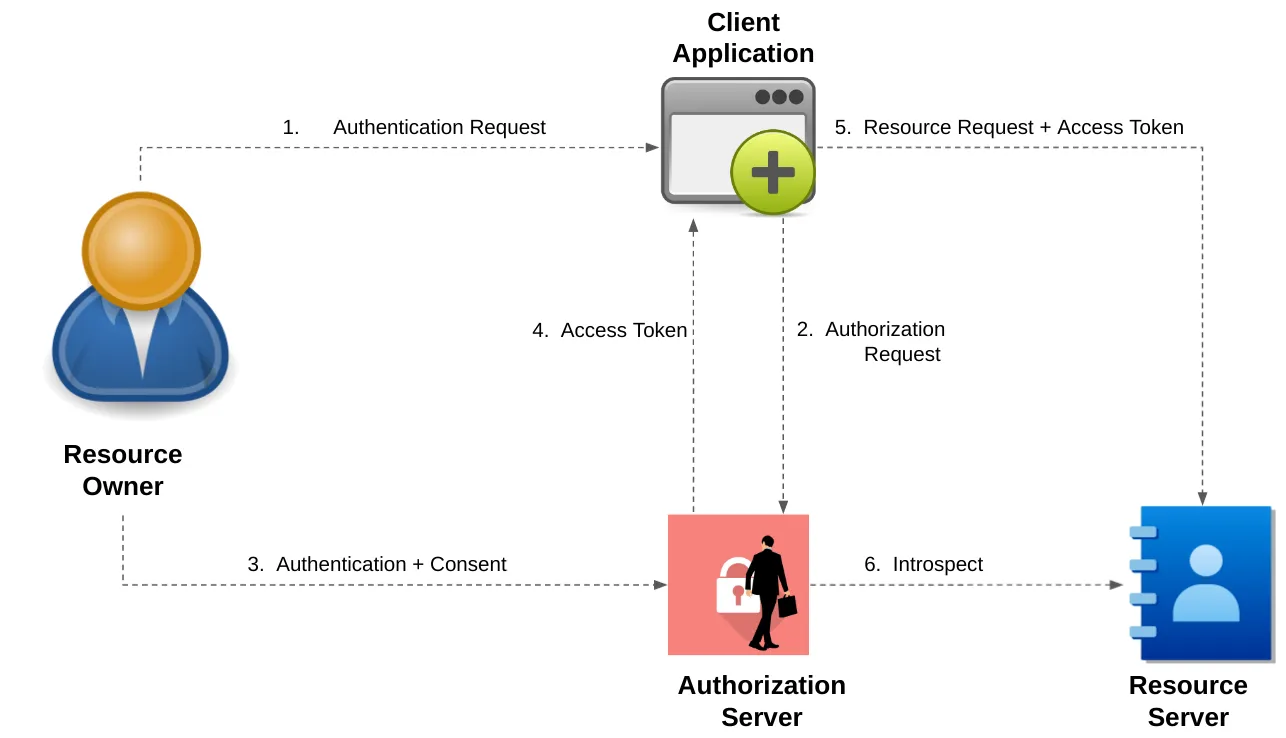
Yoinked from Medium
As a result, we often reuse the same credentials across multiple platforms, which leads to significant security risks. On top of that, there's the frustration of needing to sign up for a new service every time. Big businesses are no exception. They face the same challenges and vulnerabilities in managing secure access for their numerous applications and services.
This raises the question: “How have we managed to simplify and secure online interactions”? The answer is quite simple: some very smart individuals developed OAuth 2 and OpenID—protocols that make authorization and authentication safe.
In this article, we briefly cover the evolution of these protocols, highlight the differences and functionality, and explain why they are so impactful. We also touch on how we can use OpenID with our beloved platform, Directual.
In the early 2000s, the web lacked standardized protocols for secure user authentication. For instance, Yelp—a name that might ring a bell—had to use insecure methods, like asking users for their email addresses and passwords to access features. This approach posed significant security risks, as users unknowingly exposed their sensitive information.
To address these risks, OAuth 1 was developed as a solution for secure authorization, marking a significant improvement in user data protection. And yet, OAuth 1 had limitations like complex cryptography and cumbersome token management. These issues led to the introduction of OAuth 2 in October 2012, which offered a more secure and user-friendly approach.
Similarly, OpenID emerged in 2005, created by Brad Fitzpatrick, founder of LiveJournal. It aimed to provide a decentralized authentication protocol allowing users to log in to multiple platforms with a single set of credentials. OpenID 1.0, the initial version, used an identity URL from an OpenID provider but faced challenges with adoption and user experience.
OpenID 2.0, released in 2007, improved usability and security and gained traction with major companies like Google and Yahoo. Despite these advancements, it struggled with complexity and competition from social logins. To overcome these hurdles and build on OAuth’s success, OpenID Connect was introduced in 2014. This version, built on OAuth 2.0, combined the strengths of both protocols, offering a strong and user-friendly authentication solution that has since seen widespread adoption across various web services and applications.
OAuth 2 is fundamentally an authorization standard. It provides a way for third-party applications to access a user's data without exposing their credentials. The endpoint of OAuth 2's process is an access token, which allows applications to interact with user data within defined scopes.
In contrast, OpenID Connect (OIDC) is an authentication standard built on top of OAuth 2. While OAuth 2 focuses on granting access to data, OIDC ensures that the user is who they claim to be. This distinction is crucial: authorization allows access to resources, whereas authentication verifies identity.
Also, the significant difference is “party sides”. The authorization is the “third party” side, while authentication is the “first party” side. The difference lies in the purposes of these protocols. In authorization, you “authorize” someone to access and manipulate your data freely. You don’t participate directly in this process, so it’s named the “third party” side.
In authentication, you prove to the website that you are someone, and it should or shouldn’t allow you to access some of your data. In this process, you participate directly; that’s why it’s the “first party” side.
Imagine a website where you want to see your friend's Twitch subscriptions. Using OAuth 2, the website can request access to your friend's data without needing to know their identity. It’s all about authorization—granting permissions to access certain information.
On the other hand, when you click “Sign In with Google” on a website, you're using OpenID Connect. Here, the focus is on authentication—confirming your identity and logging you in without needing to remember yet another username and password.
To implement OAuth 2 on a website, a developer must obtain a client ID and client secret from a service provider (e.g., Google, GitHub). The OAuth 2 process, known as the “authorization flow”, typically involves the following steps:
Directual is no stranger when it comes to large businesses. Whether you are looking to streamline access to your internal CRM, HR portal and any other service, we got you covered. Our OpenID plugin is easy to install and configure, all you need is the authorization server.
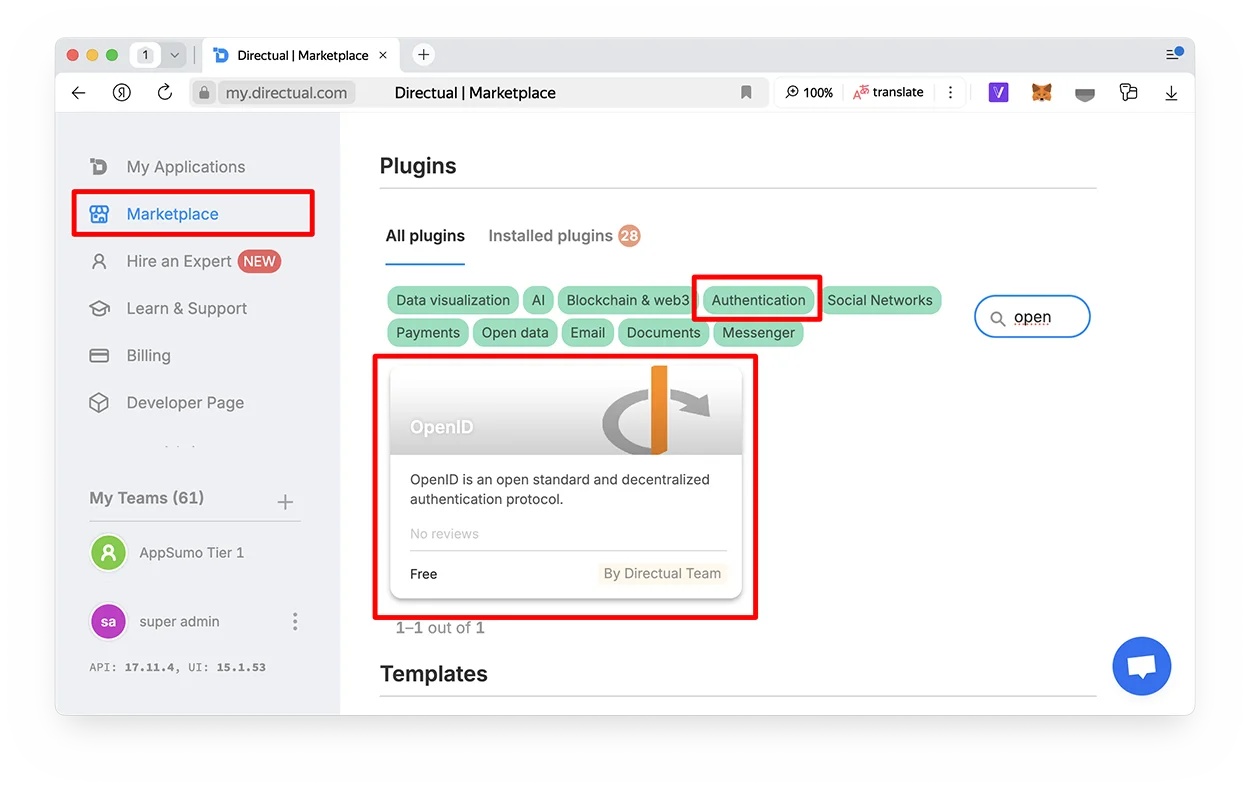
Integrating OpenID Connect with Directual offers quite a few benefits:
Sounds great, right? For more insights on what you can build on Directual, check our YouTube channel or, better yet, visit our blog. Spoiler alert: The possibilities are nearly limitless.
OpenID Connect, built on the solid foundation of OAuth 2, has become the golden standard of how we interact with web services. It eliminates the need for multiple passwords, reduces security risks, and enhances user experience. Similarly, Directual simplifies the complex process of app creation and makes it accessible to virtually anyone.
If you have any questions, feel free to reach out to us at hello@directual.com. Until next time!